What Should You Put on a Dog ID Tag? A Complete Guide
Learn the essential details every dog ID tag should carry, what to leave off for privacy, and how QR smart tags, microchips, and biometric IDs work together to bring lost pets home.

What would happen if your dog wandered off during a walk and someone found them before you did? Would they know how to reach you right away?
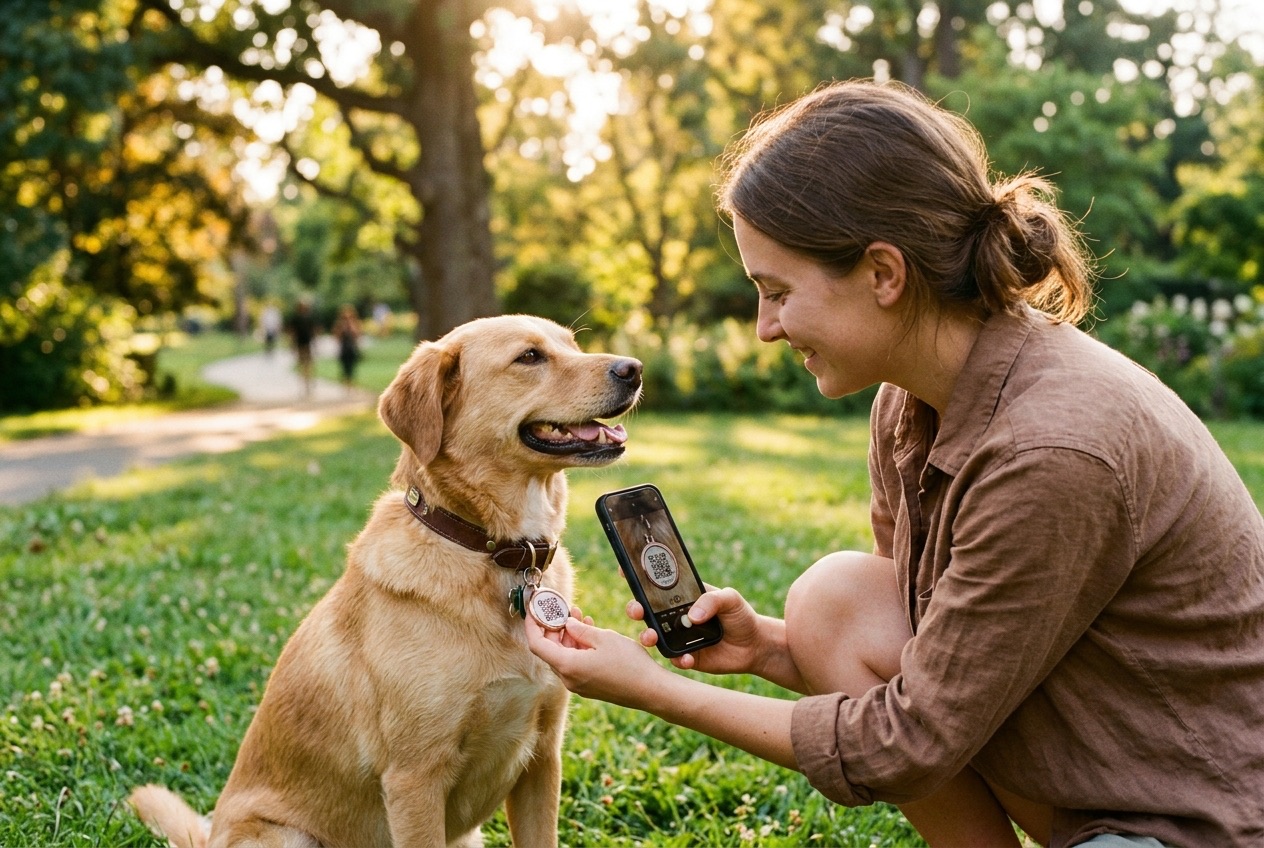
A durable QR smart dog ID tag attached to your dog's collar can make all the difference in that moment. Dogs can slip through open gates, bolt after wildlife, or get separated from their families in unfamiliar places. Even a calm, well-trained dog can go missing when startled.
According to the ASPCA, visible collar identification gives a neighbor or passerby the fastest way to reunite a found pet with their family — without needing a specialized scanner or database lookup.
Knowing what to put on a dog ID tag helps you make that small piece of hardware far more effective. Start with clear, reliable contact pathways, protect your household privacy, and understand how physical tags, microchips, and QR-linked digital profiles work together to bring lost pets home.
What Should You Put on a Dog ID Tag?
A personalized dog ID tag should prioritize fast, effortless contact so anyone who finds your pet can reach you within seconds. Keep essential dog tag information crisp, high-contrast, and easy to read at arm's length.
Here are the five most helpful details to include on your dog's identification tag:
1. Your Dog's Name
Your dog's name helps a finder speak calmly to your pet, earn their trust, and keep them from bolting into traffic. Keep it simple and legible — while a name makes approaching your dog easier, your contact pathway is what brings them home.
2. A Reliable Contact Pathway
A working mobile phone number — or a privacy-safe QR smart pet tag with instant scan notifications and anonymous messaging — is the single most important element on a dog identification tag. If engraving a phone number, choose one you can answer or check while traveling, and include your country code if you cross borders with your pet.
3. A Second Emergency Contact
If your phone battery dies or you're on a flight, a backup contact gives the finder a second lifeline. Choose a partner, family member, or trusted neighbor who knows your dog, and let them know they are listed as an emergency contact.
4. Your City or General Area (Not Your Street Address)
Listing your city and state helps a finder see immediately whether your dog wandered two blocks from home or slipped away on a road trip. Sharing your general area provides helpful geographic context without exposing your exact home address to strangers.
5. A QR Code for Expanded Digital Profile Details
A laser-engraved QR code links directly to a digital pet profile holding critical information that never fits on metal alone — including verified guardian messaging, clear photos, dietary or medical alerts, and a backup 6-character lookup code if someone prefers typing a short code into their browser.
What Is the Most Important Information on a Dog ID Tag?
Clear identification and an immediate way to reach the guardian are the most important details on any dog tag. Beyond traditional engraved lines, linking a smart QR tag to a digital profile unlocks four verification layers that strengthen pet safety:
Biometric Identity
Biometric pet identification uses your dog's unique nose print — as distinctive as a human fingerprint — or cat facial structure for non-invasive recognition, supporting identity confirmation even if a collar comes off.
Microchip Linked
A microchip-linked profile connects your dog's visible digital ID with their registered veterinary microchip record, uniting instant street-level recovery with clinic and shelter scanning.
Vet / Clinic Verified
Veterinary verification adds clinical credibility to essential health alerts — such as rabies status, seizure medications, or severe allergies — so anyone caring for a found dog understands urgent needs right away.
Guardian Verified
Guardian verification ties your dog's digital identity to verified ownership while keeping your personal phone number and street address private behind secure, two-way recovery messaging.
What Should You Not Put on a Dog ID Tag?
Knowing what to leave off a dog ID tag is just as important as knowing what to include. Avoid crowding the surface or exposing sensitive personal data:
- Your full home street address: Your city or general area is plenty. Engraving your exact street address on a visible tag creates unnecessary home privacy risks if you're away traveling.
- Too many phone numbers: Stick to one or two reliable contacts on an engraved tag. Crowding three or four lines shrinks the text and makes worn digits hard to decipher.
- Sensitive personal or financial information: Never include gate codes, personal ID numbers, or private account details.
- Long medical histories: On metal, stick to two-word flags like "Needs Meds" or "Deaf." Store complete veterinary notes and prescriptions inside your dog's digital profile.
- Decorative messages that crowd out contact info: Clever sayings are fun, but they should never shrink or replace the information that actually gets your dog home.
Dog ID Tag vs. Microchip: What's the Difference?
Veterinarians at the Cornell Riney Canine Health Center and animal welfare groups recommend using both a collar ID tag and a microchip because they solve different stages of a lost-pet emergency:
| Factor | Dog ID Tag | Microchip |
|---|---|---|
| Visibility | Visible right on your dog's collar, signaling immediately that the dog has a home. | Implanted beneath the skin between the shoulder blades; invisible to bystanders. |
| Ease of identification | Anyone can read engraved text or scan a QR tag with any smartphone camera. | Requires a compatible RFID microchip scanner at a vet clinic or animal shelter. |
| Access to owner details | Connects finders immediately via phone or privacy-safe QR recovery room. | Requires looking up the chip number in the right manufacturer registry database. |
| Information capacity | Engraved tags hold 3–4 short lines; QR-linked profiles store photos, medical alerts, and multiple contacts. | Stores a static numeric ID only; all contact details depend on external registry updates. |
| How it is fitted | Clips effortlessly onto your dog's collar or harness with zero discomfort. | Injected under the skin during a quick veterinary appointment. |
| Risk of becoming unavailable | Can detach if a collar slips off or fade on soft aluminum tags over time. | Remains permanently in place even if a dog slips out of their collar. |
| Updating details | Engraved text requires buying a new tag; QR digital profiles update in seconds in an app. | Updated online through your pet's microchip registry account. |
| Best role in pet safety | Fastest neighborhood reunion without a trip to a shelter. | Permanent backup proof of identity if a collar or tag is lost. |
Can a QR Code Replace a Traditional Dog ID Tag?
QR smart tags are rapidly becoming the modern standard for pet safety because you can update your contact details instantly, protect your personal phone number from public view, and share medical alerts that never fit on metal. Still, clarity matters: choose high-contrast, deep laser-etched 304 stainless steel hardware (like the Snootit Jewelry Collection) that pairs a scannable front QR code with a readable back lookup code so anyone can identify your dog even in low light.
How Snootit Makes Dog Identification More Complete
A traditional engraved tag is a helpful starting point, yet metal space is tiny and static. At Snootit, we combine durable physical QR hardware, non-invasive biometrics, and privacy-first digital records in one free platform:
- Biometric identification: Your dog's unique nose print or cat's facial structure establishes a permanent digital identity — even if their collar comes off.
- QR-enabled pet profiles: A single smartphone scan opens your dog's customizable public profile with zero app download required for the finder.
- Privacy-safe contact & Lost Mode: Finders reach you through Snootit's encrypted Recovery Room without ever seeing your private phone number or street address, and Lost Mode alerts nearby pet parents right away.
- Microchip & veterinary verification: Link your dog's microchip and verified health summary in one place for sitters, groomers, and emergency clinics.
Give Your Dog a More Complete Digital Identity With Snootit
Choosing what to put on your dog's ID tag comes down to one goal: making it effortless for a kind stranger to get your best friend home safely while keeping your family's private details protected. Explore Snootit's smart pet ID features and 304 stainless steel QR pet tags to give your dog an identity built for real life.
Questions & Answers
Frequently Asked Questions
What not to put on a dog ID tag?
Avoid passwords, sensitive personal details, your full street address, and long medical histories on your dog's ID tag. Don't overcrowd it with too many phone numbers or decorative messages. Keep the text readable and focus on essential identification and contact information.
What are some clever things to put on dog tags?
Short messages such as "I'm lost, please call my human" or "Help me get home" can catch a finder's attention. You can also add "Microchipped" or a QR code linked to your dog's digital profile for extra identification details.
Where to put a dog tag on a collar?
Attach the ID tag securely to your dog's collar D-ring or dedicated tag ring using a sturdy split ring or clasp. Make sure it hangs comfortably and doesn't interfere with your dog's movement, and check the attachment regularly for signs of wear.
What to put on the back of a dog ID tag?
Use the back for details that don't fit on the front, such as a second phone number, a brief medical note, "Microchipped," or an alphanumeric lookup code. If the tag supports it, a QR smart tag links directly to a digital pet profile with additional care details.
Can you put medical information on a dog tag?
Yes, you can include brief medical notes that help someone care for your dog right away, such as "Needs medication" or "Deaf." Keep the wording short and readable, and store detailed medical and vaccination records in a secure digital pet profile.

